moviebox search icon

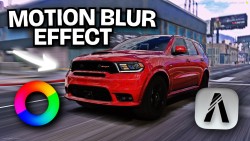
How To Add Motion Blur To Rockstar Editor Clips For FiveM! — Step By Step Tutorial

2026

R

Amerika Serikat

PC Game

Here's a step by step tutorial on how to add motion blur to rockstar editor! This is a great way to enhance photos for GTA V and FiveM. Whether you're making video content or posting in discord server media channels, this will make your photos look a lot better, more realistic, and cinematic. Link to graphics: https://blackvaultmods.com/b/KSPEd #fivem #fivemtips #fivemtutorial ➤ BlackVaultMods Discord: https://discord.gg/KrYuKY8 ➤ Become Patreon Member: https://www.patreon.com/blackvaultmods ➤ Official Website: https://www.blackvaultmods.com #fivem #fivemtips #fivemtutorial MicroATX Gaming PC ► Processor: Intel Core i5-14400 ► Graphics Card: NVIDIA MSI GeForce RTX 3060 12GB ► Installed RAM: 32 GB ► Operating System: Windows 11 Pro
More

0 /10

0 people rated

Tonton online

Tonton di app

Episode

Ulasan Pengguna

Episode
Ulasan Pengguna

Ulasan Pengguna

author avatar

Priscys Vlog

16/04/2026 04:33
How To Add Motion Blur To Rockstar Editor Clips For FiveM! — Step By Step Tutorial
Disclaimer: All videos and pictures on MovieBox are from the Internet, and their copyrights belong to the original creators. We only provide webpage services and do not store, record, or upload any content.
moviebox official logo

movieboxonline

Penafian: Semua video dan gambar di MovieBox berasal dari Internet, dan hak ciptanya dimiliki oleh pembuat aslinya. Kami hanya menyediakan layanan halaman web dan tidak menyimpan, merekam, atau mengunggah konten apa pun.